🌋 The Stromboli Project
Free + licence 🪟 Windows · Linux coming soon

Fearless Tiger

Every Claude Code session in one window. The one that needs you lights up; the idle ones go to sleep.

For Claude Code users with a lot of sessions open. Fearless Tiger lists them by project, beeps when one asks for permission or asks you something, and puts the stopped ones to sleep so they give their memory back. Click a sleeping agent and it wakes up in the same conversation, in the same folder.

Free to download and use. The first 14 days are the full version, with no account and no card. After that it keeps working, with up to 6 agents awake at once; an Animal Tools licence (€19.99, once) removes that limit and adds queues, the dispatcher and Auto-resume.

Needs Claude Code installed and signed in. Claude and Claude Code are trademarks of Anthropic; Fearless Tiger is an independent project and is not affiliated with Anthropic.

Windows desktop build

Windows may show a SmartScreen warning on first launch — click More info → Run anyway.

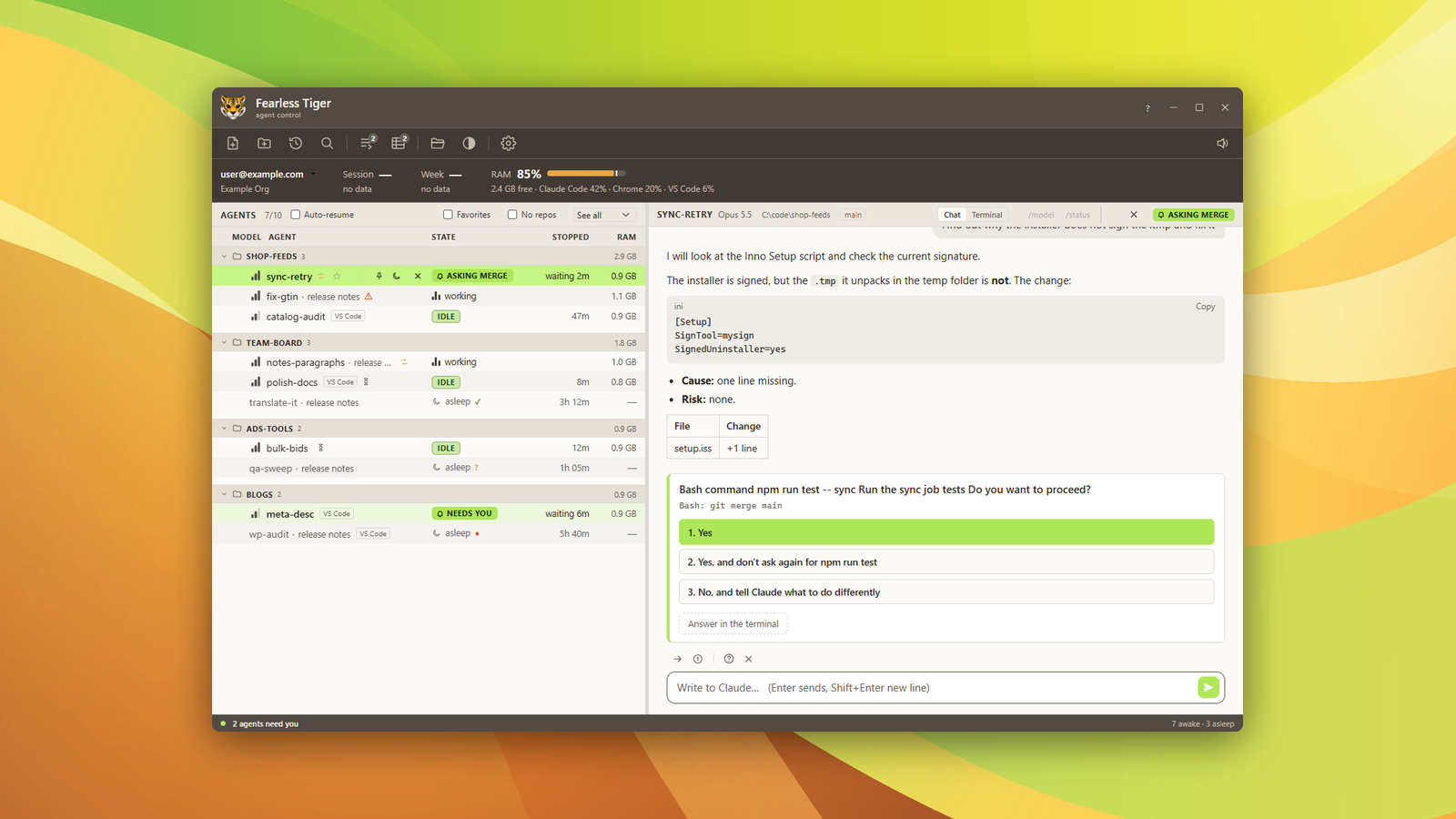
Fearless Tiger with ten agents grouped by project: one asking permission highlighted in green, one marked Needs you, the sleeping ones greyed out, and the selected agent's conversation on the right with the options to answer.
Ten agents, four projects, one window. The ones waiting for you are lit, and the sleeping ones are greyed out and show no memory in use.

Fearless Tiger is a control panel for the Claude Code sessions on your computer: a dense list on the left, the selected agent's terminal on the right and your free memory always in view.

Features

What it does with your agents, before you install it.

Every session, by project.

  • Finds the Claude Code sessions on your computer, also the ones in VS Code
  • Lists them by project with their state: working, stopped, needs you or asleep. An agent with a command or subagent still running in the background shows as working
  • Group the list by repo, without repos or by state, with a colour you pick for each repo; a button folds or unfolds them all
  • Favourites, a filter, and a switch to hide the sleeping ones

It tells you which one is waiting.

  • When an agent asks for permission or asks a question, it beeps and the row is highlighted. There is no desktop notification: a short beep, in the window
  • Marks the ones that look stuck, the ones touching the same file as another, and the ones that can be closed
  • An Overview lists every awake agent with what each one needs from you, and you can sort it by agent, state or Git
  • A short list of what was left loose (Ctrl+Shift+L, or the button in the bar): each item has Open, Snooze 1 day and Discard

Idle agents sleep, quietly.

  • An agent opened in Fearless Tiger that has been stopped for 30 minutes goes to sleep — sooner if your free memory drops — once you have accepted the hooks
  • Agents in VS Code or another terminal are only put to sleep by hand
  • A click, or an order sent to it, wakes it up in the same conversation and the same folder
  • It never puts to sleep an agent that is working or has background tasks pending

Terminals in the window.

  • Open a new agent, a sibling in the same project (Ctrl+Shift+N), or resume a previous conversation
  • Alt+1…9 picks an agent by its place in the list, and F2 renames the selected one
  • The selected agent's terminal takes the right side: you read and answer there
  • Switch the same conversation to a chat view, with a files panel beside it. The chat shows the full history, with its steps and errors, and you answer questions and permissions right there
  • A search box finds old conversations

Work left in a queue Licence

  • A general queue and one per agent: orders that go out by themselves when there is room
  • A dispatcher splits a long text into tasks and picks the folder for each. «Send» closes the window at once and the sorting goes on behind; it only comes back, with your text intact, if it has a question or could not place an order
  • «Auto-resume» wakes, one at a time, the sleeping agents that were cut off mid-task, with the model you pick in Settings, Fable 5.1 and 5.2 included
  • The free version has a limit on agents awake at once, and no queues or dispatcher

Memory and usage in view.

  • The computer's memory and what Claude Code, your browser and your editor are using
  • Your Claude usage for the last 5 hours and the week, as Claude Code reports it
  • The connected account, and a button to sign in with another one

Your Claude Code, your login.

  • It does not read or store your tokens. Signing in is always done by Claude Code itself
  • It adds its hooks to ~/.claude/settings.json only with your permission, after saving a copy, and takes them out from Settings or when you uninstall
  • With the same permission it also adds its own status line, which feeds the usage bar. If you already had one, it chains it and gives it back when you uninstall
  • No account and no telemetry. «Report a problem» only prepares an email in your mail app; nothing is sent until you send it. On its own it only goes online to check for updates and for the licence

Quiet until it matters.

  • Lives in the tray: closing the window does not close it, and it keeps watching and sleeping agents
  • Start with the system and automatic agent names are both off until you turn them on
  • A tiger roars when it starts and when you close a session
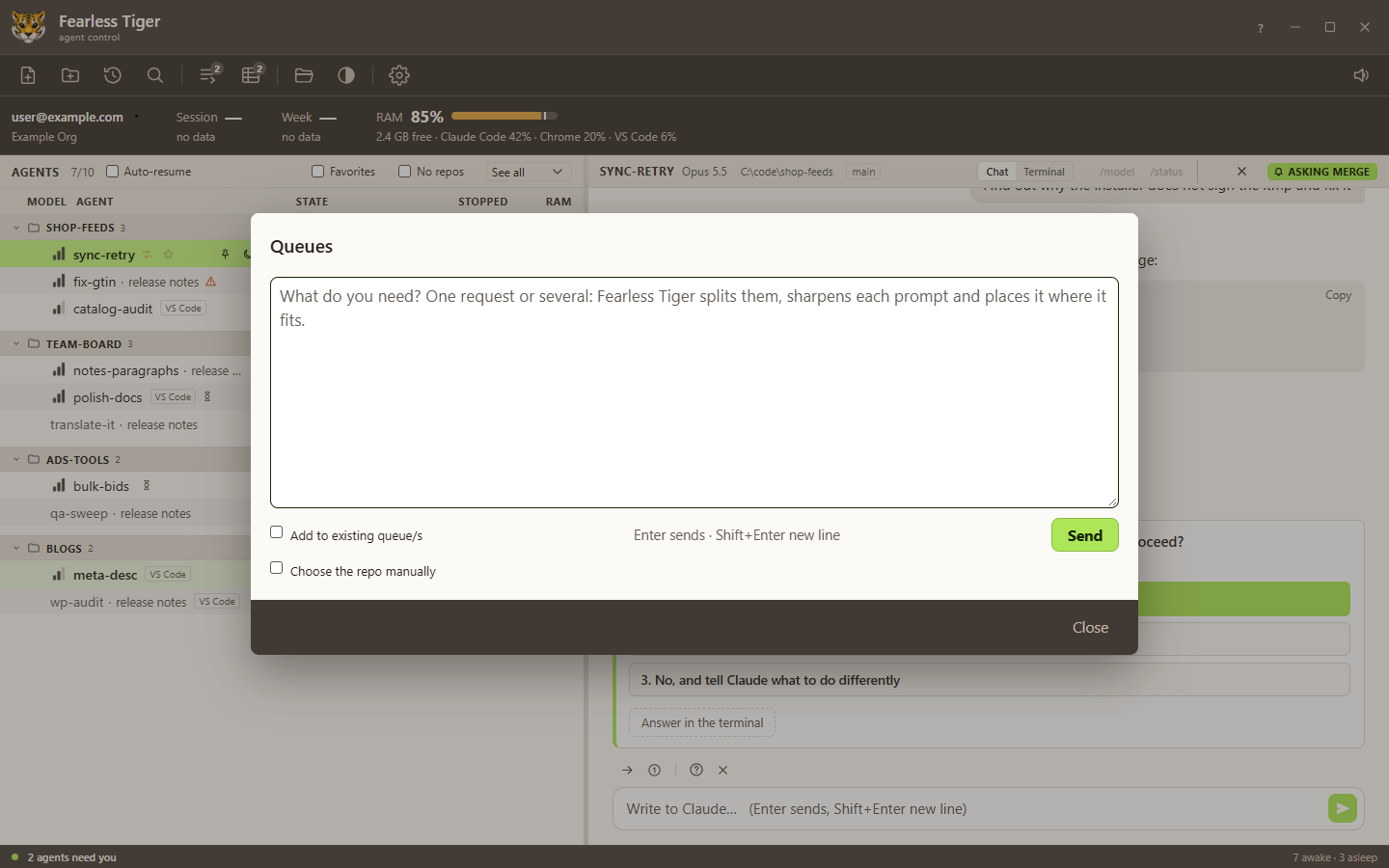
Fearless Tiger's Queues window open over the agent list, with a box to write what you need, options to add to an existing queue or choose the repo manually, and a Send button.
Write the work down once, even as several requests. With the licence, Fearless Tiger splits them, sharpens each prompt and places it where it fits.

What you get

Three things that change a long day with agents.

You know which one is waiting

The agent that asks for permission or asks a question beeps and is highlighted in the list, so you stop going through tabs to find out.

Memory back from agents you are not using

An agent that has been stopped for a while is put to sleep and gives back what it was using. When you need it, it comes back with the same conversation.

Claude Code stays yours

It runs the Claude Code you already have, with your own subscription. It never touches your tokens, and it asks before it adds anything to Claude Code's settings.

Before you install it

What it needs, and what leaves your machine.

What it needs

  • Windows. A Linux version is coming later; this page will say so when it is out
  • Claude Code, installed and signed in. Fearless Tiger runs the one you already have, with your own subscription. It does not install it or sign you in
  • Your permission for the hooks. Without them it still lists your sessions, but it cannot tell when one needs you, and it cannot put the stopped ones to sleep
  • Claude Code only. No other assistants

What leaves your machine

  • The check for updates and the licence check
  • Agent names, summaries and the dispatcher are made by your own Claude Code, with your own account, and only if you use them. Names and summaries are off until you turn them on
  • Nothing else. The log of what your agents do (kept 30 days) and the index for the search stay on your computer

Claude and Claude Code are trademarks of Anthropic, PBC. The Stromboli Project is an independent project and is not affiliated with, endorsed by or sponsored by Anthropic. Fearless Tiger works with Claude Code; it is not part of it.

How it goes

Open it. Let it listen. Answer the one that calls.

It lives in the tray, so you leave it running: the next time an agent needs you, it beeps.

  • You decide every permission, in the terminal or with a click in the window
  • It never commits, pushes or approves anything on its own
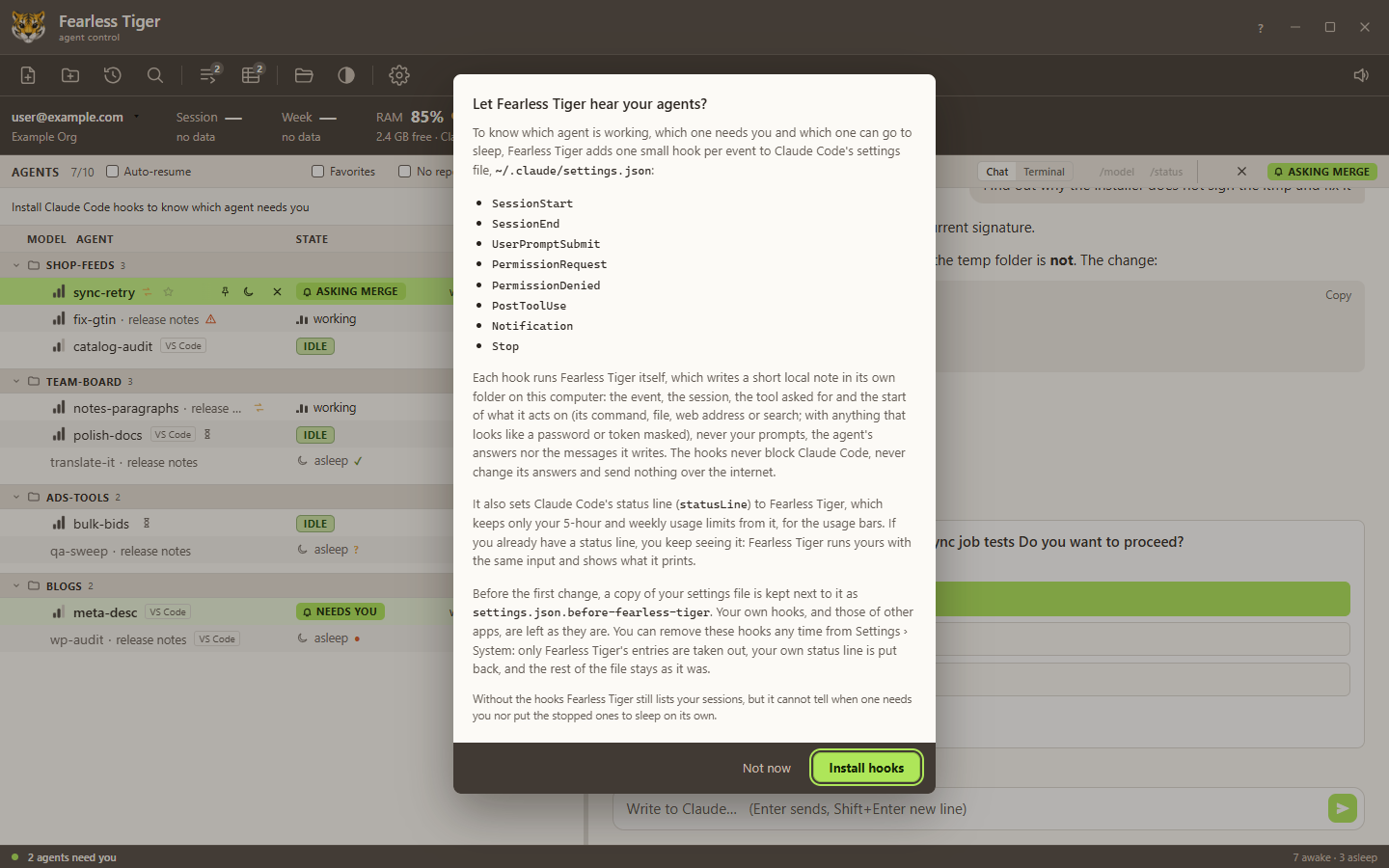
Step 1 · Accept the hooks On first launch it explains what it will add to Claude Code's settings and asks. It keeps a copy of your file first.
Step 2 · See your sessions The sessions on the computer appear by project, with their state and the memory each one uses.
Step 3 · Answer the one that needs you A beep, a highlighted row. Open it, or use the Overview to answer from one place.
Step 4 · Let the idle ones sleep The stopped agents go to sleep by themselves. Click one to wake it where you left it.
Fearless Tiger's first-launch window asking to install its hooks into Claude Code's settings, listing each hook, what it records and how to remove them, with Not now and Install hooks buttons.
It asks before it touches Claude Code's settings, keeps a copy first, and Settings takes the hooks out again.

Free version and full version

  • The first 14 days are the full version. It starts on first launch — no account, no email, no card
  • Then it stays free, with one limit. Up to 6 agents awake at once; the rest can be put to sleep and woken when you need them
  • The licence removes the limit and adds queues, the dispatcher and Auto-resume. €19.99 once, for up to 3 computers, and it also unlocks the full versions of the other tools in the collection
  • Windows first. Linux comes later

What the licence includes →

Try it

The honest test is an afternoon with the sessions you already have open.

Install it on a day with several Claude Code sessions running and see whether you stop hunting through tabs for the one that is waiting. The first fourteen days are the full version, and it stays free after that.

Who it is for

Five, ten, fifteen Claude Code sessions, and a computer that slows down.

Someone with a Pro or Max plan who works on several projects at once, on Windows and with 16 GB of memory or less. By mid-afternoon the machine drags, and there is no telling which of the tabs has been waiting for an answer.

The guide covers the same ground slowly: the hooks, the list, the Overview, sleeping and waking agents, and the queues.

Read the complete guide →

What it leaves out

A panel for your agents, not a second Claude Code.

  • Only Claude Code, with no Codex or other assistants
  • Not an IDE: it does not edit files or show diffs
  • No commits, no pushes, and no permission approved on its own
  • It cannot approve permissions for agents living in VS Code, which have no terminal here: it marks them as «needs you» and a click takes you to their window
  • It does not put to sleep an agent that is working or has background tasks pending
  • No account of its own and no telemetry