🌋 The Stromboli Project
Free + licence 🪟 Windows

Sneaky Spider Web Scraper

The ten-minute audit: paste the URL, take the Excel, close it.

It crawls the whole domain from your own machine, runs 40 SEO checks over every page and exports the result to CSV or XLSX. A free version with no end date, and a licence that does not expire either.

Free to download and use. The first 14 days are the full version, with no account and no card. After that it keeps crawling and auditing, up to 50 pages per crawl; an Animal Tools licence (€19.99, once) removes the limit.

Windows and Linux desktop builds · the Linux packages can be on an earlier version

Windows may show a SmartScreen warning on first launch — click More info → Run anyway.

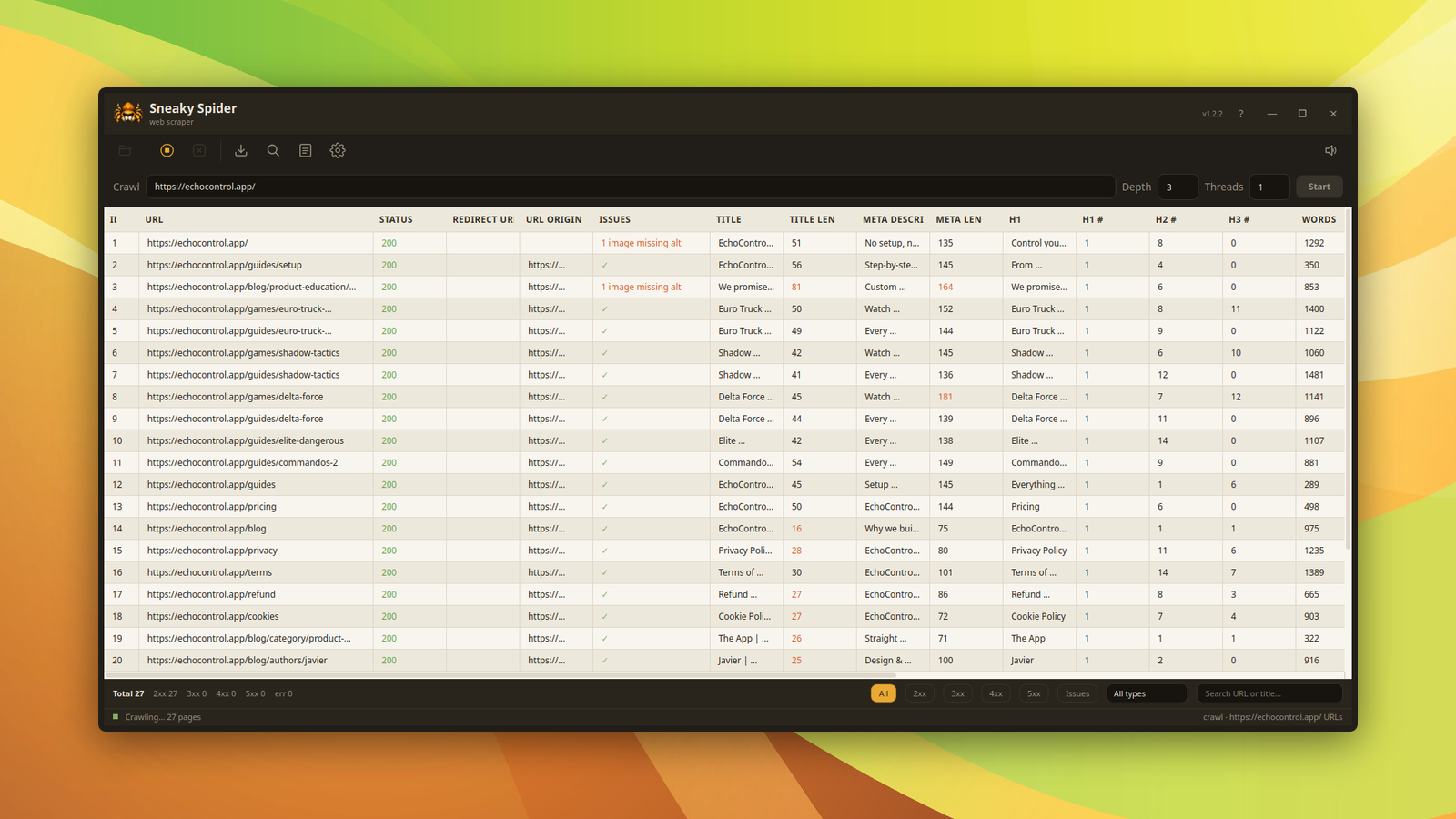
Sneaky Spider mid-crawl, with the results table filling in row by row and the progress counter running.
Point it at a domain and watch every page land in the table, row by row — on your own machine, with no account.

Sneaky Spider crawls a domain, audits every page against 40 SEO checks and hands you the spreadsheet — on your machine, with no account and no yearly renewal.

Features

Everything it does, before you install it.

Crawl a domain, or just a list.

  • Follows the internal links of a site and respects its robots.txt
  • List mode audits the URLs you give it, discovering nothing new
  • URLs from a file, pasted, typed, or read from the site's sitemap.xml
  • Stop and resume without losing pages or repeating them

What it reads from every page.

  • Title, meta description, H1 (and how many), H2, H3, canonical, meta robots
  • Status code, content type, response time, size and where it redirects to
  • Word count, images, and images with no alternative text
  • Internal links in and out, how deep the page sits, and where it was first discovered
  • Whether it is indexable — and why not, when it is not
  • Whether a secure page is loading insecure resources

40 SEO checks, in three levels.

  • Basic, intermediate and advanced, each one an error, a warning or a notice
  • Click a check and the table filters to the pages it affects
  • Export the whole checklist, or one check at a time
  • Duplicate titles, meta descriptions and H1s across the whole crawl

Broken links, inside and out.

  • Internal broken links, with the page each one lives on
  • External links on request, throttled so it does not hammer other people's servers
  • Redirect chains resolved to the final destination, loops included
  • A doubtful 404 or 503 is measured again before it is reported

Sitemap, hreflang and structured data.

  • URLs in the sitemap.xml that nothing links to — the real orphans
  • URLs that get crawled and are missing from the sitemap
  • Which languages a page declares, whether the code is valid, and whether the other side points back
  • Whether the page carries structured data, and of what type

It says when the HTML is not the page.

  • It reads the HTML the server returns; it does not render JavaScript
  • On a site painted with JavaScript it warns you instead of filing a report it cannot back
  • WordPress, Shopify, PrestaShop, Wix and the ordinary corporate site read fine

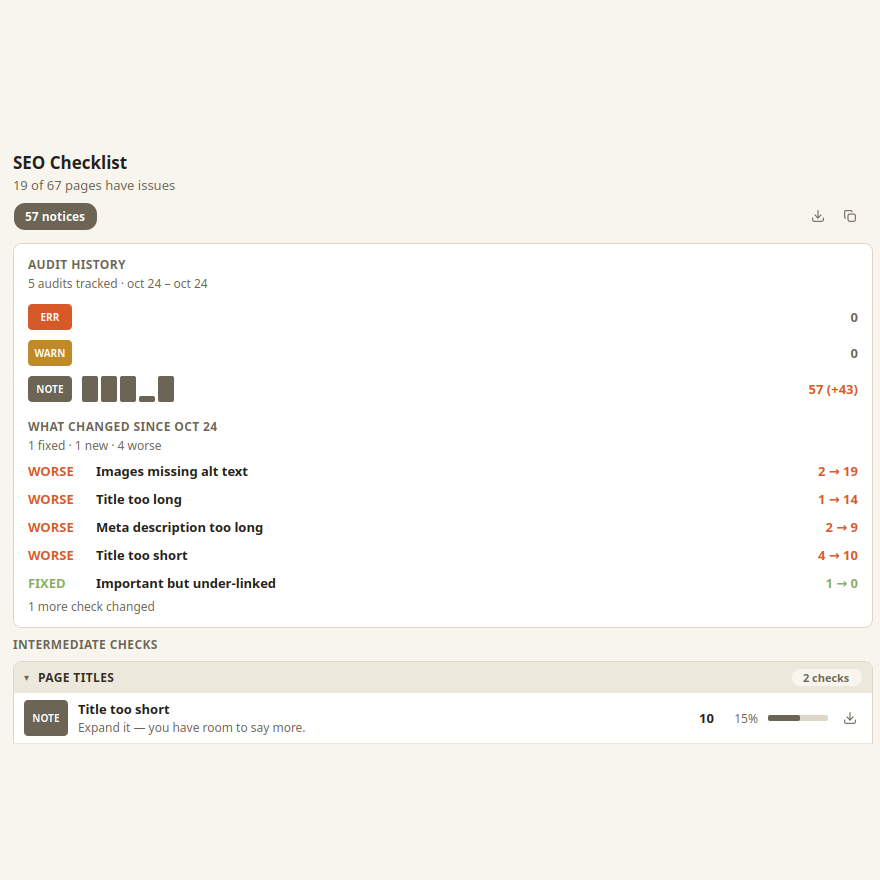
What changed since the last audit.

  • Keeps the summary of each audit per site — up to ten, across five sites
  • Shows the trend and what moved: fixed, new, or still there
  • Only the counts are stored: never the crawl, never a single URL
  • Remembers the last five sites you audited
  • Interface size: Normal, +30% or +50% — the same app, larger

The spreadsheet, and a button for the assistant.

  • CSV and XLSX with the columns already clean
  • Copy the report as plain text and paste it into an AI assistant
  • Export the whole checklist as JSON, HTML, or PDF — pick the format when you save it
  • Optional title and meta description suggestions — off by default, with your own Google Gemini or Groq key, and a Test key button to check it
  • Without a key the app behaves exactly as if the feature did not exist
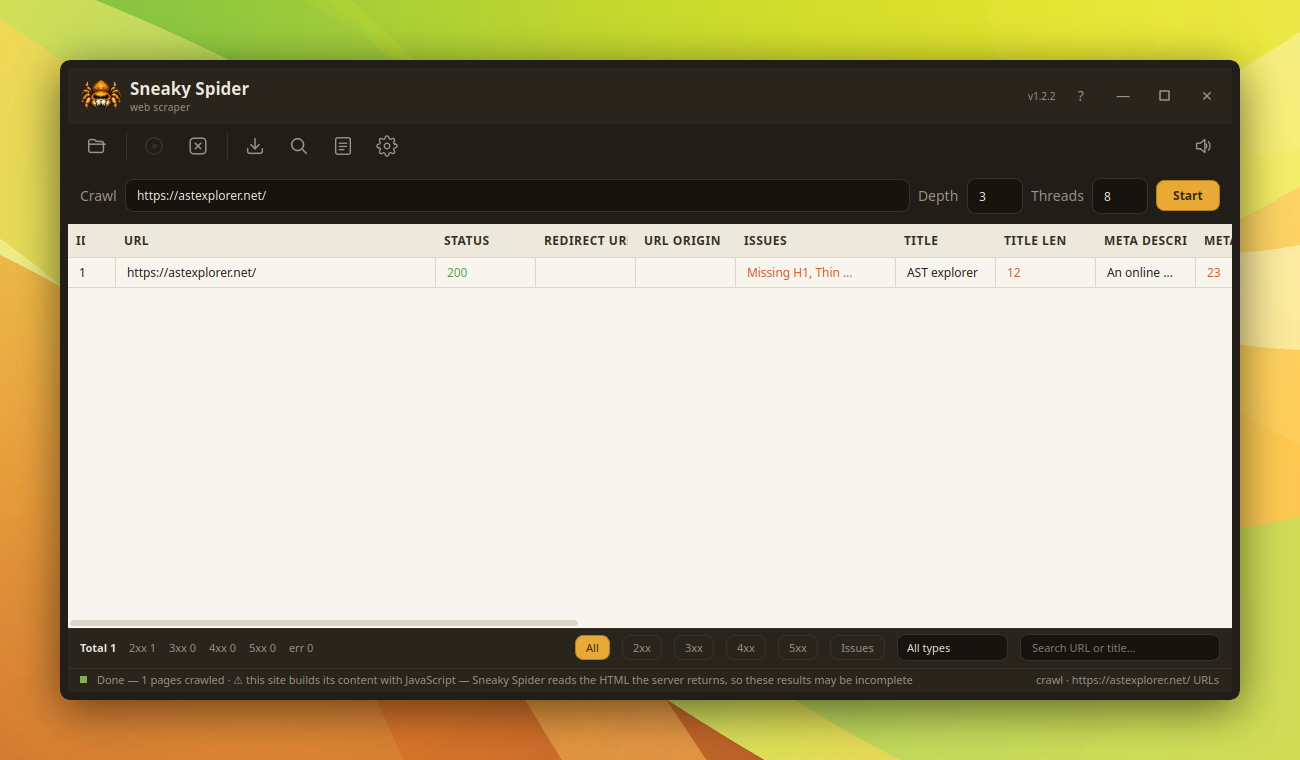
Sneaky Spider's warning that the site is rendered with JavaScript and the crawled HTML may be incomplete.
It tells you when a site is built with JavaScript, so you know the crawl can’t see everything before you trust the report.

What you get

Three things that decide how it ends.

A spreadsheet you can hand over

CSV or XLSX with the columns already clean — not a dump you have to spend ten minutes trimming before anyone else can read it.

40 checks that say what to fix

Each one carries its severity and what to do about it, and clicking it filters the table down to the pages affected.

A licence that does not expire

One payment. No account, no monthly plan, and no year in which the tool you already paid for stops working.

The one thing

Sneaky Spider audits your website and gives you results you can actually read, filtered to the pages that need fixing and ready to export. It remembers past audits for each site, follows redirect chains to the end and catches the loops. Optional AI suggests titles and meta descriptions where they’re missing.

— Javier, The Stromboli Project
A square image chosen to go with what the maker says about Sneaky Spider
Audit, filter to what needs fixing, export. That’s Sneaky Spider.

Before you install it

What it needs, and what it cannot see.

What it needs

  • Windows, 64-bit, or Linux. A signed Windows installer, or a .deb or AppImage on Linux (experimental, sometimes a version behind), and nothing else to set up first: no Java, no Node, no Docker, no container
  • A site you are allowed to crawl. It follows robots.txt, and the external link check never starts on its own — it is opt-in and throttled, because those requests go to other people's servers
  • HTML that the server returns. It does not render JavaScript. WordPress, Shopify, PrestaShop, Wix and the ordinary corporate site read fine; a single-page app does not — and there it tells you, instead of handing you a report it cannot back
  • No account. Nothing to register, nothing to verify, no plan to keep alive

What leaves your machine

  • The licence check
  • A version check when it starts, to tell you whether there is a newer build. If you update, it stops any crawl and closes itself, so the installer never writes over a running copy — and it only ever opens one window
  • Only if you switch the writing help on and tick pages yourself: the URL, title, meta description and H1 of those pages, sent to the provider of your own key, Google Gemini or Groq
  • Nothing else. The crawl, the results and the exports stay where they are

How it goes

Paste the URL. Take the Excel.

It remembers the last five sites you audited, so the second pass over a client is one field shorter than the first.

  • Stop and resume without losing what it already crawled
  • Recheck a single row without restarting the crawl
Step 1 · Point it at the site Paste the domain — or import a list of URLs from a file, from the clipboard, or from the site's own sitemap.xml.
Step 2 · Let it crawl Rows fill in as the answers come back. Stop whenever you want; start again and it picks up where it left off instead of crawling it all twice.
Step 3 · Read the checklist 40 checks grouped by type across three levels, each with its severity. Click one and the table shows only the pages it affects.
Step 4 · Export CSV or XLSX with the columns already clean — or copy the report as text and paste it into an assistant.

Compared

The ten-minute audit, next to the two full crawlers.

Screaming Frog SEO Spider is the crawler most SEOs already know; FreeCrawl is the free, open-source one built to match it. Both do more than Sneaky Spider, and the rows below say where. What Sneaky Spider offers is narrower: paste the URL, take the spreadsheet, and keep a licence that does not expire.

Sneaky Spider compared with Screaming Frog SEO Spider and FreeCrawl
Sneaky SpiderFree + licence · closed source Screaming Frog SEO SpiderYearly licence · closed source FreeCrawlFree · open source
What it audits
Crawls a whole domain and checks every page ✓40 checks in three levels ✓Links, meta data, directives, duplicates ✓200+ checks in 14 categories
Renders sites built with JavaScript —Reads the server’s HTML, and says so ✓Integrated Chromium ✓Chromium via Playwright
Connects to Search Console and Analytics —Works from the site alone ✓Analytics, Search Console, PageSpeed ✓Search Console, GA4, PageSpeed
What it costs
Price Free; full version €19.99 once 245 € per user per year Free
Keeps working without renewing ✓The licence does not expire ✕“Licences last 1 year” ✓Nothing to renew
Where it runs
Source code you can read ✕Closed source ✕Closed source ✓MIT licence
macOS and Linux ✕Linux (experimental), no macOS ✓ ✓

✓included✕not available—left out on purpose

Comparison based on the published pages of each product — screamingfrog.co.uk for Screaming Frog SEO Spider (paid licence, 1 to 4 licences), and freecrawl.net and its GitHub repository for FreeCrawl 1.0.0 — verified 2026-09-30. The licence term quoted in the trial conditions below is Screaming Frog’s own wording. Features and prices change: check their sites for current details. The Stromboli Project is an independent project, not affiliated with, endorsed by or sponsored by Screaming Frog Ltd or the authors of FreeCrawl. All product names are trademarks of their respective owners.

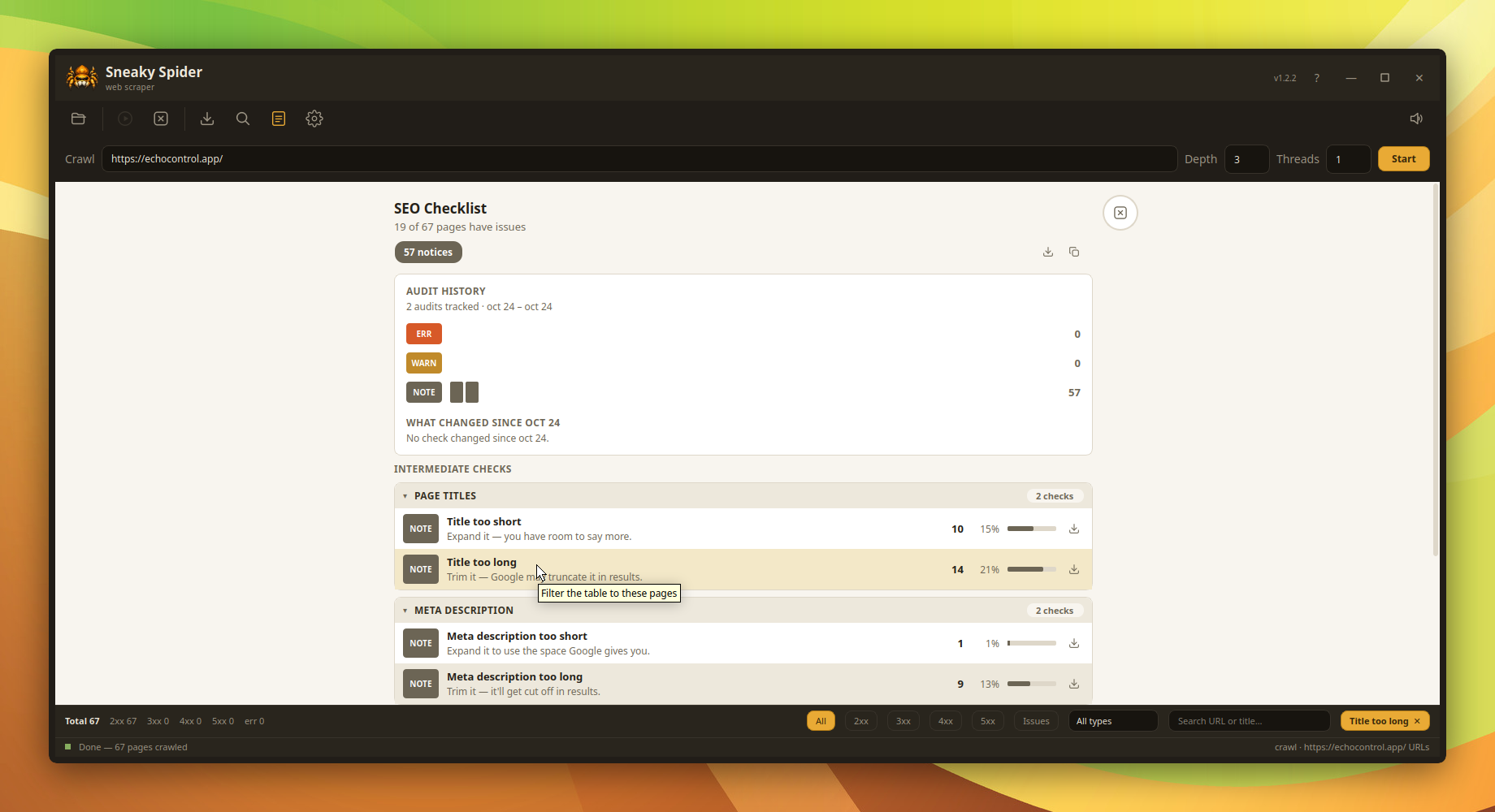
Sneaky Spider's SEO checklist with its groups and severities, one check selected and the results table filtered to the affected pages.
40 SEO checks sorted by severity: click one and the table shows only the pages you need to fix.

Free version and full version

  • The first 14 days are the full version. It starts on first launch — no account, no email, no card
  • Then it stays free, with one limit. Crawls are capped at 50 pages; the checklist, exports and history stay
  • The licence removes the limit. €19.99 once, for the full version of Sneaky Spider and every other tool that has one. You paste the key into the app you already installed
  • The licence does not expire. There is no renewal date and no year in which it stops working. The best-known crawler in the comparison above charges 245 € a year and states that “Licences last 1 year. After that you will be required to renew your licence”

What the licence includes →

Try it

The honest test is the site you were going to audit anyway.

Install it, paste the domain you have to report on this week, and see whether the spreadsheet that comes out is the one you would have sent. The first fourteen days are the full version, and it stays free after that.

Who it is for

The audit you have to deliver on Thursday.

The freelance auditing a client's catalogue before writing the report. The developer checking that a migration did not leave pages without a title or with broken canonicals. The European shop in four languages that needs to know whether its hreflang is right. The marketing lead who wants to know how many product pages have an empty meta description — without learning a new tool or signing up to a monthly plan.

The guide covers the same ground slowly: the first crawl, the checklist, broken links, the sitemap cross-check and the exports.

Read the complete guide →

What it leaves out

A crawler, not an SEO platform.

  • No JavaScript rendering: it reads the HTML the server returns, and says so when that is not enough
  • No backlinks and no keyword positions — those need somebody else's database
  • No server logs, no Core Web Vitals, no Search Console and no Analytics
  • No scheduled or unattended crawls: you open it, you crawl, you close it
  • Nothing is uploaded: the crawl, the results and the exports stay on your machine
  • No dragging URL files onto the window — they come in through the import dialog, which gives you more say over what enters

In the app

More screenshots

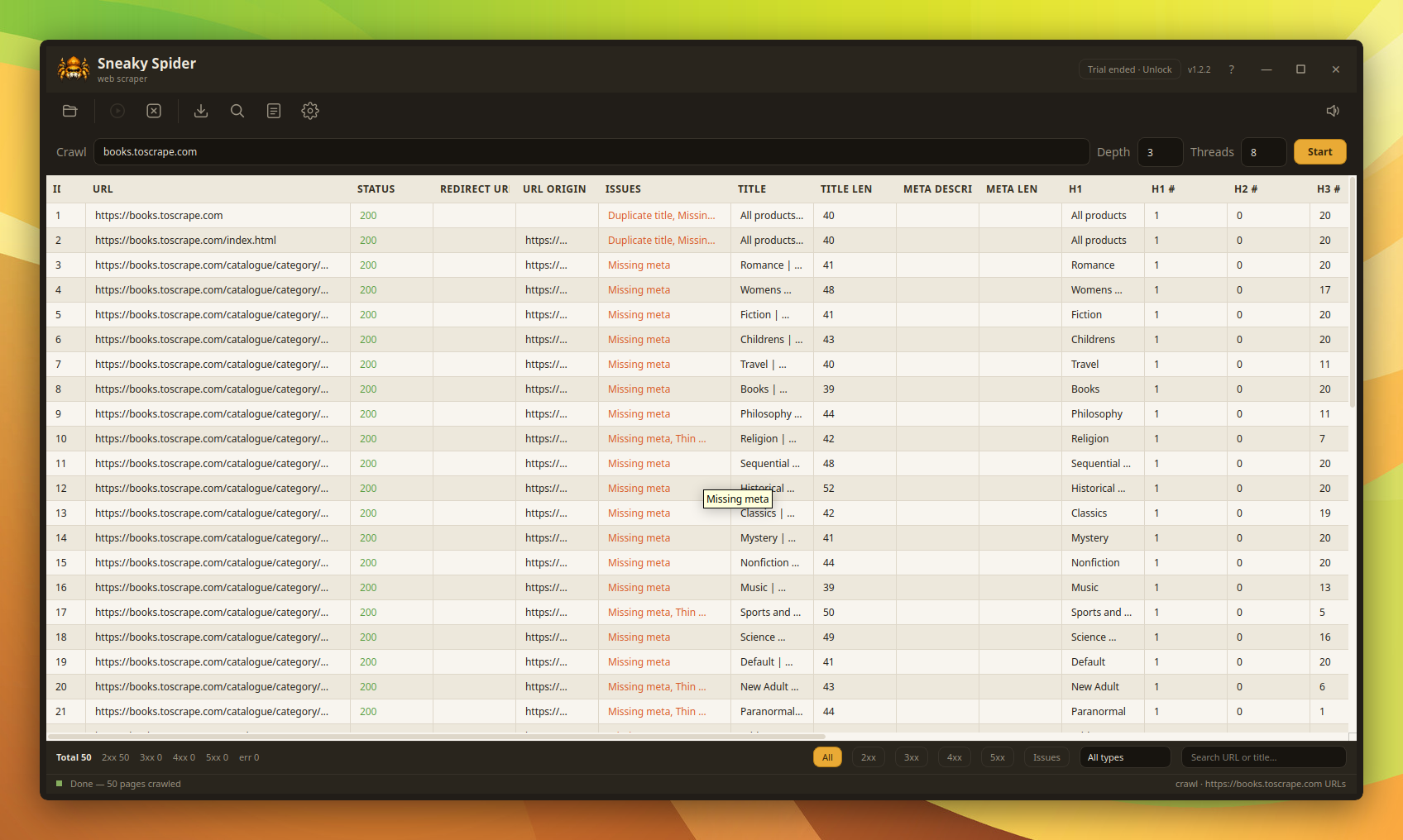
Fifty pages crawled: status, title, meta description, headings and issues for each one, side by side
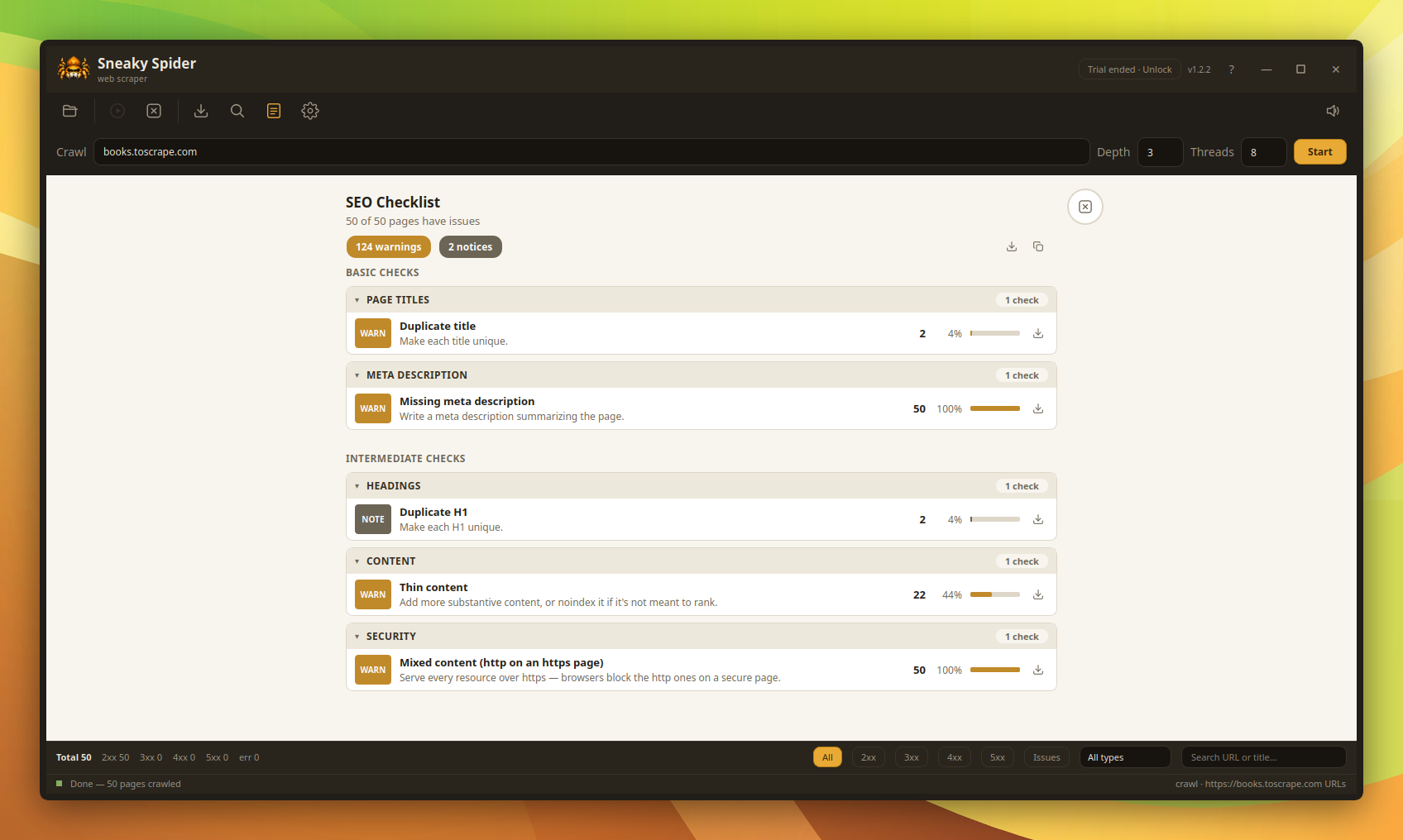
The SEO checklist groups every problem by severity, with how many pages it hits
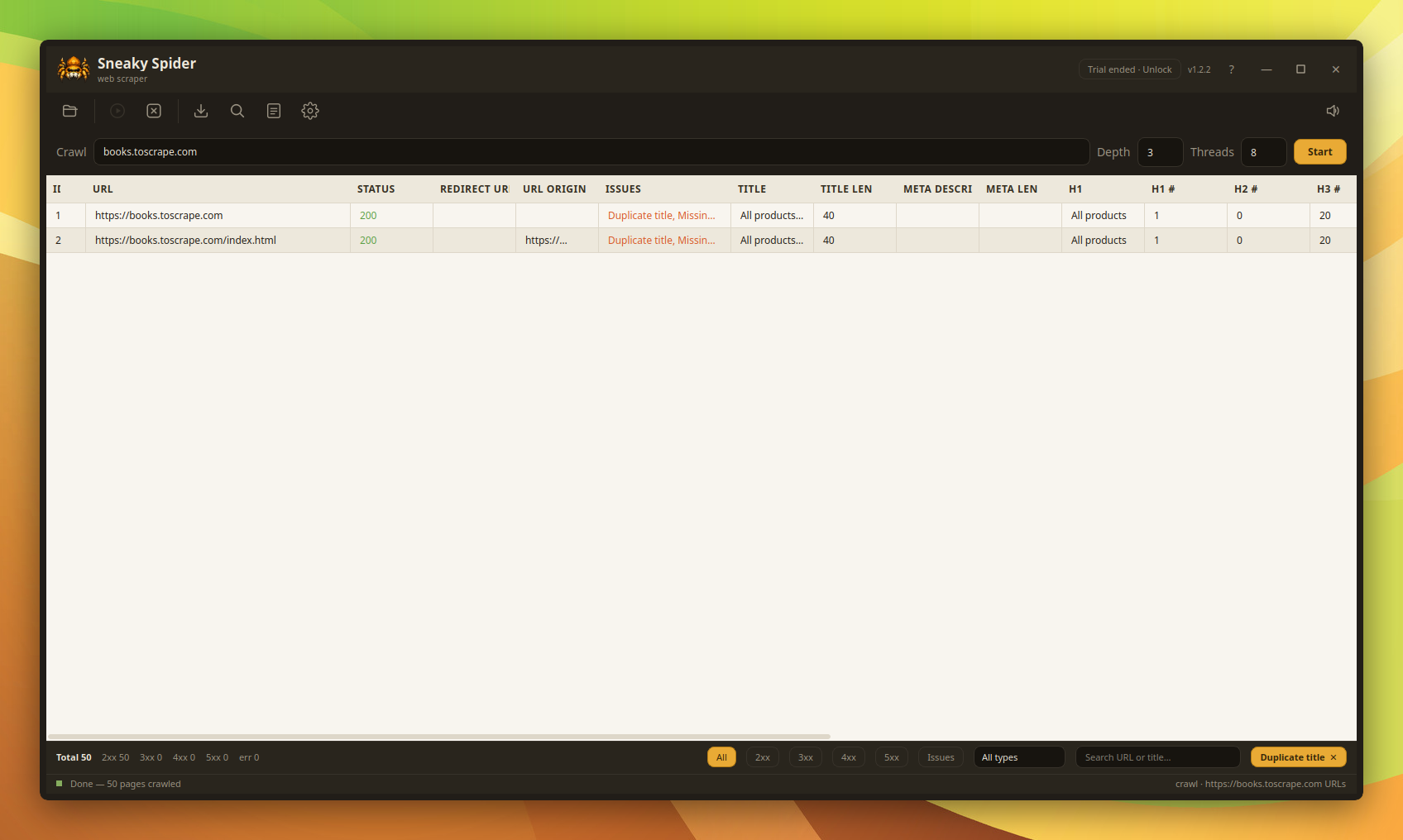
Click a check and the table shows only the pages that need fixing
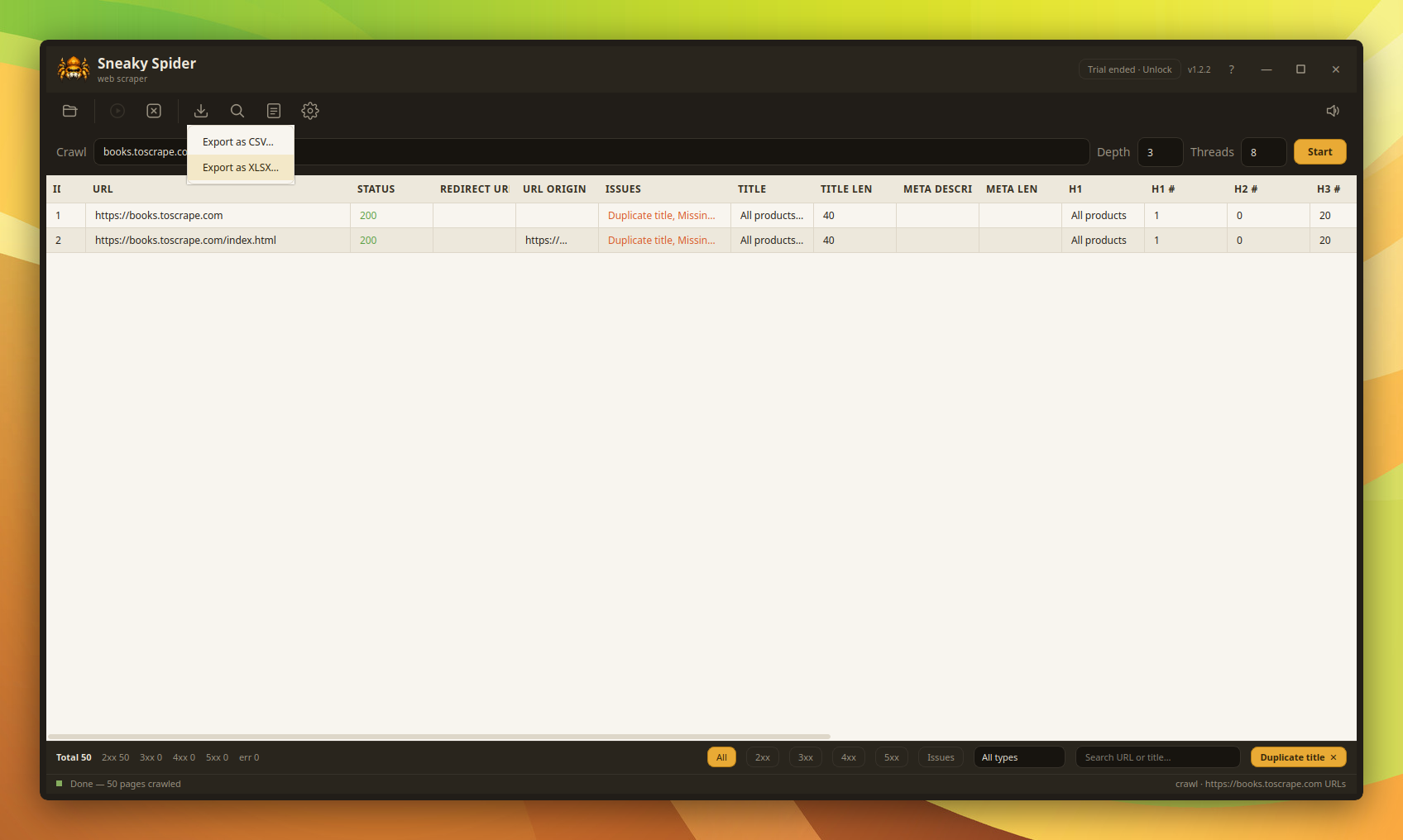
Export the results to CSV or Excel, ready for your report